Program overview Program overview
 |
|
InRoads data exchange plug-in is a data link tool developed to link CAD
and VR forBentley System's .
It can import data from 3 dimensional road design CAD "InRoads".
It allows using CAD data in VR effectively and feedback of VR simulation
result to CAD . You can smoothly make use of the interactive data exchange
between CAD data.
"InRoads" is a 3D land development/road design system, which
have full functions for a road construction project and a road land design
in constructing site. It has a high level DTM function, such as a user
defined standard section like spiral, slope, and water channel and parametric-driven
decision making chart, which all act interactively. Users can extract an
analysis contour chart from the models top view, side view, sectional view
and oblique line. |
|
 Related Information Related Information |
 Assembly Operation Document Assembly Operation Document
Seminar
|
|
|
Program functions and features
|
|
 Functions Functions
- Land development
- Horizontal line in consideration of transition curve
- Automatic creation of bank in accordance with the design speed
- Automatic creation of road section and display
- Earthwork calculation from terrain status and planned terrain status
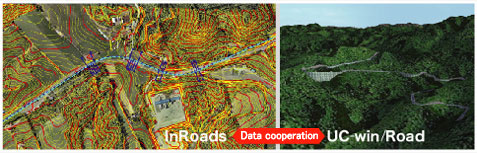
Linkage function with UC-win/Road
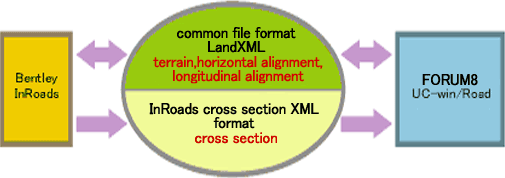
- Data is exchanged based on the import and export functions for LandXML
file.
As for cross section data, it is exchanged by using the original XML format
of InRoads (Only import from InRoads to UC-win/Road is available). Thanks to the seemless interface, both formats can be loaded
at the same time, and integrated 3D models of terrain and road are generated.
It is also possible to export LandXML data from UC-win/Road and import
the terrain and road alignment information in InRoads.
Feature of data exchange function
- importing data:
- Generation of road: horizontal alignment, longitudinal alignment, cross
section
Update road: horizontal alignment, longitudinal alignment, cross section)
Select data from tree Tree View
- exporting data:
- Select road and terrain
|
|
Specifications
-
-
|
InRoads -> UC-win/Road |
UC-win/Road -> InRoads |
| horizontal alignment |
Generates road by combining alignment element discreeted to element to
4 element with IP method
- transition curve-circle-transition curve
- transition curve-circle
- circle-transition curve
- circle
|
Exports alignment information of IP method by de-blocking the alignment
element (parameter information of straight line, circle) |
| longitudinal alignment |
Convert by elevation of starting point and ending point, intersection elevation
of longitudinal transition point and VCL. Bridge and tunnel section can
be seen |
| cross section |
Shows all of sectional shape. regarding surface or slope, user can define
the area to import |
not available |
| terrain |
Showss TIN, contour line and boundary line data
<Case 1>
Read to Geographical Survey Institute 50m elevation data(2D mesh) as batch
data
<Case2>
Shows the center of 20km x 20km terrain data as data |
Exports terrain data of UC-win/Road as TIN data |
|
|

 data exchange with UC-win/Road data exchange with UC-win/Road |
|
 Developed by Bentley System (https://www.bentley.com/en) Developed by Bentley System (https://www.bentley.com/en)
|
|